The Lutron Caseta Deluxe Smart Switch Kit is my best overall smart home automation kit pick for buyers who want dependable lighting control, a hub, and a Pico remote in one package. For a more flexible starting point, the Amazon Smart Home Starter Kit bundles an Echo Hub with bulbs and a plug, while the Besisglas Home Assistant Starter Kit suits people who want to build around sensors and Home Assistant. The main tradeoff is between a focused kit that handles one job well and a broader setup that can connect more device types but may take more setup. Wiring, hub requirements, wireless standards, and the devices already in your home can change which kit makes sense. Read on for how the 12 options differ and which one best fits your plans.

Get the little things that make your day delivered free with Prime
- Fast, free delivery on millions of items
- Prime Video, Amazon Music and more included
- Member-only deals all year
Key Takeaways
- Lutron Caseta takes the lighting lead: Its switch and dimmer kits offer several ways to control installed lights, while Pico remotes add a physical control point without replacing the wall switch.
- The Amazon kit is the broadest ready-to-use bundle: Echo Hub, a smart plug, and four bulbs give beginners more device types to try than the lighting-focused Lutron and Kasa kits.
- Three-way wiring narrows the field: Kasa HS210, Kasa KS230, and meross kits target multi-location lighting, so buyers should check their existing circuit before choosing a standard switch kit.
- Hub choice shapes future expansion: Besisglas centers on Home Assistant and Zigbee, Tapo pairs Matter-compatible sensors with its hub, and THIRDREALITY includes a bridge for its switch setup.
- The kits serve different goals, not one universal definition of automation: KEYESTUDIO is for learning to build projects, Tapo focuses on door and window sensing, and Lutron, Kasa, and meross focus on lighting control.
| Lutron Caseta Deluxe Smart Switch Kit with 2 Switches, Hub, Pico Remote, and Wallplate |  | Best for Reliable Whole-Room Lighting | Included: 2 smart switches, Smart Hub, Pico remote, bracket, and white wallplate | Connectivity: Amazon Alexa, Apple HomeKit, Google Home, Ring, and Sonos | Hub connection: Works without Wi-Fi | VIEW ON AMAZON | See Our Full Breakdown |
| Kasa Smart HS210 3-Way Switch Kit, 2-Pack |  | Best for Wi-Fi 3-Way Lighting | Model: HS210 | Quantity: 2 smart switches | Wiring: Neutral wire required | VIEW ON AMAZON | See Our Full Breakdown |
| KEYESTUDIO ESP32 Smart Home Starter Kit for Arduino and Python |  | Best for Learning DIY Automation | Model: KS5009-2 | Controller: ESP32 development board | Programming languages: Arduino C++ and MicroPython | VIEW ON AMAZON | See Our Full Breakdown |
| Besisglas Home Assistant Starter Kit with Zigbee Hub and 2 Sensors |  | Best for Local Home Assistant Control | Operating system: Home Assistant OS | Processor: Rockchip RK3528 quad-core | Memory: 4 GB DDR3 RAM | VIEW ON AMAZON | See Our Full Breakdown |
| Lutron Caseta Smart Dimmer Starter Kit with Smart Hub, Pico Remote, and Wall Plate Bracket |  | Best for Homes Without Neutral Wiring | Included components: Smart Hub, in-wall dimmer, Pico remote, and wall plate bracket | LED dimming capacity: Up to 150 W | Neutral wire required: No | VIEW ON AMAZON | See Our Full Breakdown |
| Kasa Smart 3-Way Dimmer Switch Kit (KS230 KIT v2) | 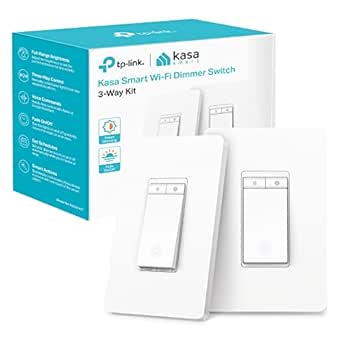 | Best 3-Way Dimmer for Kasa Users | Model: KS230 KIT v2 | Circuit type: 3-way | Dimming range: 1%–100% | VIEW ON AMAZON | See Our Full Breakdown |
| Tapo T31 Matter-Compatible Door and Window Sensor Kit with 3 Sensors and Smart Hub |  | Best for Entry Monitoring | Included components: Three Tapo T110 contact sensors and one Tapo H100 hub with chime | Wireless protocol: Sub-G | Wi-Fi requirement: 2.4 GHz | VIEW ON AMAZON | See Our Full Breakdown |
| Lutron Caseta Smart Switch Starter Kit with Hub and Wallplate | 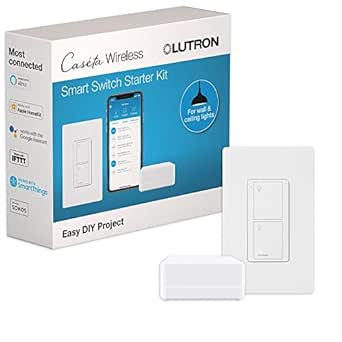 | Best for Hub-Based Switch Control | Included components: Smart switch, Caseta Smart Hub, and white wallplate | Operation mode: On/off | Operating voltage: 120 V | VIEW ON AMAZON | See Our Full Breakdown |
| Amazon Smart Home Starter Kit with Echo Hub, Smart Plug, and 4 Smart Bulbs |  | Best All-in-One Alexa Starter | Included items: Echo Hub, Amazon Smart Plug, and four Amazon Basics Smart Bulbs | Display: 8-inch touchscreen, 1280 × 800 resolution | Connectivity: Dual-band Wi-Fi, Bluetooth, Zigbee, Thread, and Matter controller | VIEW ON AMAZON | See Our Full Breakdown |
| meross 3-Way Smart Dimmer Switch Kit |  | Best for Apple HomeKit Flexibility | Installation: 3-way; neutral wire required | Included switches: Main and secondary | Connectivity: 2.4 GHz Wi-Fi | VIEW ON AMAZON | See Our Full Breakdown |
| THIRDREALITY Smart Switch Starter Kit with Bridge |  | Best for Wiring-Free Switch Automation | Switch type: Toggle or rocker | Installation: Surface mount; no wiring required | Neutral wire: Not required | VIEW ON AMAZON | See Our Full Breakdown |
| Lutron Caseta Deluxe Smart Dimmer Starter Kit with Hub, 2 Dimmers, and 2 Pico Remotes |  | Best for Multi-Room Lighting Control | Included components: 1 Smart Hub, 2 dimmer switches, 2 Pico 3-button remotes, 2 wall plates | LED dimming capacity: Up to 150W | Neutral wire: Not required | VIEW ON AMAZON | See Our Full Breakdown |
| smart home automation kit | Connectivity | Included components |
|---|---|---|
| Lutron Caseta Deluxe Smart Swi | Amazon Alexa, Apple HomeKit, Google Home, Ring, and Sonos | — |
| Kasa Smart HS210 3-Way Switch | — | — |
| KEYESTUDIO ESP32 Smart Home St | — | Expansion board, wooden house parts, DHT11, PIR motion sensor, gas sensor, RFID module, SK6812 RGB lighting, servo motors, fan, LCD1602, and connection cables |
| Besisglas Home Assistant Start | — | — |
| Lutron Caseta Smart Dimmer Sta | Caseta Smart Hub; compatible with Alexa, Apple HomeKit, Google Home, Ring, and Sonos | Smart Hub, in-wall dimmer, Pico remote, and wall plate bracket |
| Kasa Smart 3-Way Dimmer Switch | 2.4 GHz Wi-Fi | — |
| Tapo T31 Matter-Compatible Doo | — | Three Tapo T110 contact sensors and one Tapo H100 hub with chime |
| Lutron Caseta Smart Switch Sta | Caseta Hub works without Wi-Fi | Smart switch, Caseta Smart Hub, and white wallplate |
| Amazon Smart Home Starter Kit | Dual-band Wi-Fi, Bluetooth, Zigbee, Thread, and Matter controller | — |
| meross 3-Way Smart Dimmer Swit | 2.4 GHz Wi-Fi | — |
| THIRDREALITY Smart Switch Star | — | Smart switch, bridge, 2 AAA batteries, mounting hardware |
| Lutron Caseta Deluxe Smart Dim | — | 1 Smart Hub, 2 dimmer switches, 2 Pico 3-button remotes, 2 wall plates |
More Details on Our Top Picks
Lutron Caseta Deluxe Smart Switch Kit with 2 Switches, Hub, Pico Remote, and Wallplate
For buyers who want to automate existing lights rather than replace bulbs, this kit pairs two in-wall switches with a hub and Pico remote. Its hub works without Wi-Fi, so app and smart-home integrations have a dedicated connection instead of relying on the home network. Schedules, scenes, geofencing, and support for Alexa, Apple HomeKit, Google Home, Ring, and Sonos give it broader control options than the Kasa Smart HS210 3-Way Switch Kit, which depends on 2.4 GHz Wi-Fi and focuses on Alexa and Google Assistant.
The tradeoff is installation: these switches require a neutral wire, and their 150 W LED limit may rule out some larger lighting loads. Choose the single-dimmer Lutron Caseta starter kit instead if your wiring has no neutral or you only need to automate one dimmable circuit.
Pros:- Controls existing compatible lights without requiring smart bulbs
- Includes two switches, a hub, and a Pico remote
- Hub connection works without Wi-Fi
- Supports schedules, scenes, geofencing, and several major smart-home platforms
Cons:- Requires a neutral wire at the switches
- LED load is limited to 150 W per switch
- Pico wall-mount bracket is sold separately
Best for: Homeowners with neutral-wired lighting circuits who want two switches, multiple control methods, and broad smart-home compatibility.
Not ideal for: People with no neutral wire at the switch, or anyone whose LED load exceeds 150 W per switch.
- Included:2 smart switches, Smart Hub, Pico remote, bracket, and white wallplate
- Connectivity:Amazon Alexa, Apple HomeKit, Google Home, Ring, and Sonos
- Hub connection:Works without Wi-Fi
- Wiring:Neutral wire required
- LED capacity:Up to 150 W
- Incandescent/halogen capacity:Up to 600 W
- Operating voltage:120 V
- Switch configuration:Single-pole and 3-way
Our verdict“Choose this kit for two neutral-wired lighting circuits and hub-based control that does not depend on Wi-Fi.”
Kasa Smart HS210 3-Way Switch Kit, 2-Pack
The HS210 is a straightforward choice when one light is controlled from two locations, such as at opposite ends of a hallway or stairway. It includes two Wi-Fi switches, so you can replace the paired controls without adding a separate hub. App control, schedules, away mode, and Alexa or Google Assistant access make it more focused on practical switching than the KEYESTUDIO ESP32 Smart Home Starter Kit, which teaches DIY electronics rather than automating household wiring.
That simplicity comes with a network dependency: setup and remote features require 2.4 GHz Wi-Fi, and both switches need neutral wiring. The Lutron Caseta Deluxe Smart Switch Kit offers a hub connection that works without Wi-Fi and more platform integrations, but the HS210 is the more direct fit if you want a two-location Wi-Fi switch and do not need that broader system.
Pros:- Two switches control a light from one or two locations
- No separate hub is needed
- Supports app control, schedules, and away mode
- Works with Amazon Alexa and Google Assistant
Cons:- Requires a neutral wire at the installation points
- Depends on a 2.4 GHz Wi-Fi network
- Installation may call for an electrician if you are unfamiliar with wiring
Best for: Homeowners replacing a neutral-wired 3-way light circuit who use Alexa or Google Assistant and have 2.4 GHz Wi-Fi.
Not ideal for: People without neutral wiring, a compatible 2.4 GHz network, or confidence working with in-wall electrical wiring.
- Model:HS210
- Quantity:2 smart switches
- Wiring:Neutral wire required
- Wireless:2.4 GHz Wi-Fi (IEEE 802.11b/g/n)
- Voltage:120 V
- Maximum wattage:1800 W
- Control:App, voice, and remote control
- Voice assistants:Amazon Alexa and Google Assistant
Our verdict“Pick the HS210 for a Wi-Fi-based 3-way lighting circuit when its wiring and network requirements match your home.”
KEYESTUDIO ESP32 Smart Home Starter Kit for Arduino and Python
This kit treats smart home automation as a project to build, not a ready-made system to install. Its ESP32 board, sensors, and 13 guided projects introduce Arduino C++ and MicroPython through examples such as motion detection, temperature and humidity monitoring, RFID access, and Wi-Fi app control. That makes it a better fit for learning how connected devices work than the Besisglas Home Assistant Starter Kit, which arrives with Home Assistant OS and sensors for someone setting up a local automation hub.
The hands-on format is also the main limitation: the wooden house arrives unassembled, and the kit needs six AA batteries that are not included. It is not a replacement for a finished switch or home hub, and the short one-month warranty may be a concern for buyers seeking a long-term installed system. Choose it for experimentation and instruction, not convenience.
Pros:- Offers 13 guided smart-home and IoT projects
- Teaches both Arduino C++ and MicroPython
- Includes a broad mix of sensors, display, lighting, and control modules
- Tutorials provide wiring diagrams, code explanations, and assembly guidance
Cons:- Requires assembly and programming rather than offering plug-and-play automation
- Six AA batteries are required but not included
- Warranty is limited to one month
Best for: Teens and adults who want guided practice with ESP32 projects, basic sensors, and Arduino C++ or MicroPython.
Not ideal for: Buyers seeking an installed, ready-to-use home automation hub or people who do not want to assemble and program hardware.
- Model:KS5009-2
- Controller:ESP32 development board
- Programming languages:Arduino C++ and MicroPython
- Projects:13
- Included components:Expansion board, wooden house parts, DHT11, PIR motion sensor, gas sensor, RFID module, SK6812 RGB lighting, servo motors, fan, LCD1602, and connection cables
- Battery requirement:6 AA batteries, not included
- Assembly:Unassembled DIY kit
- Warranty:1 month
Our verdict“Choose KEYESTUDIO to learn how smart-home devices are built, not to automate a home with minimal setup.”
Besisglas Home Assistant Starter Kit with Zigbee Hub and 2 Sensors
Unlike the switch kits in this roundup, the Besisglas is a small computer for running a local Home Assistant system. Home Assistant OS comes preinstalled, and the included Zigbee coordinator and two sensors give buyers a starting point for automations such as reacting to a door opening or tracking room conditions. That makes it a more capable foundation for mixing devices than the Lutron Caseta Deluxe Smart Switch Kit, which is centered on lighting control and its own hub.
The compact, fanless hardware suits a permanent setup, but this is still a hub project rather than a complete home kit: it needs Ethernet to get started, and buyers will need to configure automations and add compatible devices as needed. Its 4 GB of RAM and 32 GB of storage are modest, so it is less suited to someone planning a resource-heavy installation than a focused local-control setup.
Pros:- Home Assistant OS is preinstalled
- Supports local smart-home control and automation
- Includes a Zigbee coordinator with external antenna and two sensors
- Compact, fanless design
Cons:- Requires Ethernet to get started
- Included sensors are only a starting point for a broader system
- 4 GB RAM and 32 GB storage limit headroom for more demanding setups
Best for: Home Assistant users who want a compact local-control hub, Zigbee support, and starter sensors for building their own automations.
Not ideal for: People who want a simple app-only setup, cannot connect the hub by Ethernet, or expect a large collection of included devices.
- Operating system:Home Assistant OS
- Processor:Rockchip RK3528 quad-core
- Memory:4 GB DDR3 RAM
- Storage:32 GB eMMC
- Zigbee coordinator:ZBM-MG21 USB dongle with Silicon Labs EFR32MG21 chip and 5 dBi external antenna
- Included sensors:Temperature and humidity sensor; door/window contact sensor
- Ports:2 USB ports, HDMI, and Ethernet
- Dimensions:4.41 x 1.26 x 4.41 inches
Our verdict“Choose this kit if you want a compact Home Assistant base for local automations and are comfortable configuring the system.”
Lutron Caseta Smart Dimmer Starter Kit with Smart Hub, Pico Remote, and Wall Plate Bracket
For a home where the switch box lacks a neutral wire, this Lutron kit solves a common installation barrier: its dimmer does not require neutral wiring. The package includes one in-wall dimmer, a Caseta Smart Hub, and a Pico remote, so you can control compatible existing bulbs from the wall, app, remote, or supported voice assistants. Compared with the Lutron Caseta Deluxe Smart Switch Kit with 2 Switches, this is the better wiring fit for some older homes, but it covers one dimming circuit rather than two switched circuits.
The hub enables scheduling and smart-home integrations, though it also means the system is not a hub-free Wi-Fi setup like the Kasa Smart HS210. Its 150 W dimmable LED limit may also restrict the load, and a wall plate is not included. This is a focused starter kit, not the right choice if you need multiple circuits or a complete wall finish in the box.
Pros:- Dimmer works without a neutral wire
- Controls compatible existing bulbs without requiring smart bulbs
- Includes a Pico remote for wireless control from another location
- Hub supports app control, schedules, and voice assistant integrations
Cons:- Smart-home connectivity requires the Caseta Smart Hub
- Wall plate is not included
- Supports up to 150 W of dimmable LED lighting
Best for: Owners of older homes with no neutral wire at the switch who want smart dimming for one compatible lighting circuit.
Not ideal for: Buyers needing multiple automated circuits, a wall plate included in the package, or a system that does not require a hub.
- Included components:Smart Hub, in-wall dimmer, Pico remote, and wall plate bracket
- LED dimming capacity:Up to 150 W
- Neutral wire required:No
- Connectivity:Caseta Smart Hub; compatible with Alexa, Apple HomeKit, Google Home, Ring, and Sonos
- Remote battery:CR2032, included
- Wall plate:Not included
Our verdict“Choose this single-circuit Caseta kit when your switch box has no neutral wire and you want hub-based smart dimming.”
Kasa Smart 3-Way Dimmer Switch Kit (KS230 KIT v2)
I’d choose this kit when the main goal is adding app and voice control to a light already operated from two wall locations. Its 1%–100% dimming, schedules, and physical controls give it more flexibility than an on/off kit such as the Lutron Caseta Smart Switch Starter Kit. It also includes both the main and satellite dimmer, so the 3-way setup is addressed in one package. The tradeoff is installation and bulb compatibility: a neutral wire and 2.4 GHz Wi-Fi are required, and the dimmer is not designed for smart Wi-Fi bulbs. Compared with the meross 3-Way Smart Dimmer Switch Kit, this is a straightforward choice for Alexa or Google Assistant households, but buyers should check their wiring and lighting before choosing either kit.
Pros:- Controls a 3-way lighting circuit from both switch locations
- Offers app, voice, and physical switch control with 1%–100% dimming
- Supports schedules and Alexa and Google Assistant
- Includes a satellite dimmer, wall plates, and a 2-year warranty
Cons:- Requires a neutral wire and a 2.4 GHz Wi-Fi network
- Not compatible with smart Wi-Fi bulbs
- Maximum load is 150 W for dimmable LEDs and 300 W for incandescent lighting
Best for: Homeowners with a neutral wire who want dimming and voice or app control for a conventional 3-way light circuit.
Not ideal for: Renters, homes without neutral wiring, or buyers who want to dim smart Wi-Fi bulbs rather than compatible wired lighting.
- Model:KS230 KIT v2
- Circuit type:3-way
- Dimming range:1%–100%
- Maximum load:300 W incandescent; 150 W dimmable LED
- Operating voltage:120 V AC
- Connectivity:2.4 GHz Wi-Fi
- Wiring requirement:Neutral wire required
- Compatible assistants:Amazon Alexa, Google Assistant
- Warranty:2 years
Our verdict“Choose this Kasa kit if you want app-connected dimming on a conventional 3-way circuit and have the required wiring.”
Tapo T31 Matter-Compatible Door and Window Sensor Kit with 3 Sensors and Smart Hub
This kit is the lineup’s clearest choice for automations based on whether doors or windows open: it pairs three contact sensors with a hub that can sound a built-in chime. App alerts, activity history, and a customizable 90 dB alarm make it more directly useful for entry awareness than a lighting-focused kit such as the Amazon Smart Home Starter Kit with Echo Hub, Smart Plug, and 4 Smart Bulbs. The sensors can also trigger compatible lights or cameras, giving them a role beyond notification. The catch is that they depend on the included Tapo hub, so this is not a set of standalone sensors to add freely to any system. Buyers should also check their 2.4 GHz Wi-Fi availability. I’d favor it for targeted door and window routines, not as a broad controller for every smart device.
Pros:- Includes three contact sensors and a hub with a built-in chime
- Sends real-time notifications and keeps activity history
- Customizable alarm reaches 90 dB
- Magnetic or adhesive mounting avoids tool-based installation
Cons:- Sensors require the included Tapo hub to operate
- Requires a 2.4 GHz Wi-Fi network
- Its automation focus is entry monitoring rather than direct control of a wide range of devices
Best for: Households that want alerts and light or camera routines for several doors, windows, or other openings.
Not ideal for: Buyers seeking standalone sensors, an all-purpose smart home controller, or a kit that operates without 2.4 GHz Wi-Fi.
- Included components:Three Tapo T110 contact sensors and one Tapo H100 hub with chime
- Wireless protocol:Sub-G
- Wi-Fi requirement:2.4 GHz
- Alarm volume:90 dB
- Sensor battery life:Up to 2 years
- Mounting:Door or window; magnetic or adhesive
- Compatible platforms:Alexa, Google Home, Matter, smartphone, and tablet
- Sensor dimensions:2.42 × 1.48 × 0.48 in
Our verdict“Pick this kit when you want several openings monitored and linked to alerts or compatible lights and cameras.”
Lutron Caseta Smart Switch Starter Kit with Hub and Wallplate
I’d put this starter kit on the shortlist for buyers who want a wall switch connected through a dedicated hub rather than relying on the home Wi-Fi network for switch communication. The Caseta Smart Hub works without Wi-Fi, while the switch supports app, voice, and wall control plus scheduling and geofencing. That makes it a different proposition from the Kasa Smart 3-Way Dimmer Switch Kit: this is an on/off switch, not a dimmer or a 3-way kit. Its stated load support also accommodates several kinds of lighting and fans, but installation still calls for a neutral wire. The included Pico remote is not part of the package, so buyers wanting a second wireless control point will need to purchase it separately. I’d choose this for hub-centered routines, not adjustable light levels.
Pros:- Included hub works without Wi-Fi
- Supports app, voice, and physical wall-switch control
- Scheduling and geofencing can automate everyday lighting
- Supports multiple compatible lighting types and ceiling or exhaust fans within stated load limits
Cons:- Requires a neutral wire and hard-wired installation
- Provides on/off control only, with no dimming
- Pico remote and its mounting bracket are sold separately
Best for: Homeowners with neutral wiring who want a hub-based on/off switch with scheduling, geofencing, and broad smart home integrations.
Not ideal for: Buyers who need dimming, a 3-way switch kit, or a Pico remote included in the box.
- Included components:Smart switch, Caseta Smart Hub, and white wallplate
- Operation mode:On/off
- Operating voltage:120 V
- Maximum lighting load:600 W incandescent, halogen, ELC, or MLV
- LED/CFL load:5 A
- Fan load:3 A ceiling or exhaust fans
- Wiring:Hard-wired; neutral wire required
- Connectivity:Caseta Hub works without Wi-Fi
- Compatible platforms:Amazon Alexa, Apple Home, Google Home, Ring, Sonos, and Samsung
Our verdict“Choose this kit for hub-based on/off lighting control and location-aware routines, but skip it if dimming is a requirement.”
Amazon Smart Home Starter Kit with Echo Hub, Smart Plug, and 4 Smart Bulbs
Among these options, this is the most immediately useful starting point for someone building an Alexa-centered system: the box combines an Echo Hub with an 8-inch touchscreen, a smart plug, and four bulbs. Rather than focusing on one circuit like the Kasa Smart 3-Way Dimmer Switch Kit, it offers a visible control point and several device types to begin automating together. Its support for Zigbee, Thread, and Matter, alongside Wi-Fi and Bluetooth, also gives the hub a wider device-connection role than a single-purpose switch kit. That breadth comes with a dependency: setup requires an internet connection, and the optional stand is sold separately. The hub is meant for a fixed spot, not handheld use. I’d recommend it for buyers who want a central Alexa interface, but not for anyone seeking an internet-free setup.
Pros:- Combines an Echo Hub, smart plug, and four smart bulbs
- 8-inch touchscreen provides a dedicated place to view and control devices
- Supports Wi-Fi, Bluetooth, Zigbee, Thread, and Matter devices
- Guided setup is designed to simplify getting started
Cons:- An internet connection is required for setup
- Optional stand is sold separately
- Designed for fixed placement rather than handheld or portable use
Best for: Alexa-focused households starting from scratch that want a touchscreen controller, plug, and several bulbs in one kit.
Not ideal for: Buyers who need setup without internet, a portable hub, or a kit centered on hard-wired switches rather than bulbs and a plug.
- Included items:Echo Hub, Amazon Smart Plug, and four Amazon Basics Smart Bulbs
- Display:8-inch touchscreen, 1280 × 800 resolution
- Connectivity:Dual-band Wi-Fi, Bluetooth, Zigbee, Thread, and Matter controller
- Dimensions:7.9 × 5.4 × 0.6 in
- Weight:12.9 oz
- Power:12.5 W adapter included
- Setup requirement:Internet connection
- Warranty:1-year limited warranty
Our verdict“Choose this kit if you want a touchscreen-led Alexa setup with several device types included from the start.”
meross 3-Way Smart Dimmer Switch Kit
This kit suits buyers who want a 3-way dimmer without adding a separate hub for ordinary Wi-Fi operation. It includes main and secondary switches for controlling a light from two locations, and its platform list spans Apple HomeKit, Alexa, Google Assistant, and SmartThings. Compared with the Kasa Smart 3-Way Dimmer Switch Kit, its strongest distinction is that broader stated compatibility, including HomeKit; remote HomeKit access, however, requires a compatible Apple home hub. The tradeoffs are practical: it still needs a neutral wire and 2.4 GHz Wi-Fi, and its main switch cannot pair with a standard 3-way switch. That last limitation makes it less flexible for replacing only part of an existing setup. I’d select it when platform choice matters more than keeping conventional 3-way switch hardware.
Pros:- Includes main and secondary switches for a two-location lighting circuit
- Supports dimming, on/off control, schedules, and sunrise/sunset settings
- Works with HomeKit, Alexa, Google Assistant, and SmartThings
- Does not require an extra hub for Wi-Fi operation
Cons:- Requires a neutral wire and 2.4 GHz Wi-Fi
- Remote HomeKit control requires a compatible Apple home hub
- Main switch cannot be paired with a standard 3-way switch
Best for: Homeowners with neutral wiring who want a Wi-Fi 3-way dimmer compatible with Apple HomeKit and other major voice platforms.
Not ideal for: Buyers without neutral wiring, those using 5 GHz-only Wi-Fi, or anyone who needs the main switch to pair with a standard 3-way switch.
- Installation:3-way; neutral wire required
- Included switches:Main and secondary
- Connectivity:2.4 GHz Wi-Fi
- Hub requirement:No extra hub for Wi-Fi; Apple home hub required for remote HomeKit control
- Compatible platforms:Apple HomeKit, Siri, Amazon Alexa, Google Assistant, and SmartThings
- Operating voltage:120 V
- Maximum wattage:480 W
- Control:Dimming and on/off
Our verdict“Choose meross if you need a hub-free Wi-Fi dimmer with broad platform support and can use its matched 3-way switches.”
THIRDREALITY Smart Switch Starter Kit with Bridge
THIRDREALITY’s Smart Switch Starter Kit is the most fitting choice here for automating an existing toggle or rocker switch without opening the wall or adding a neutral wire. Its surface-mounted mechanism physically operates the switch, while the included Zigbee bridge adds app, voice, group, timer, and schedule controls through supported platforms. Compared with the Lutron Caseta Deluxe Smart Dimmer Starter Kit, this is aimed at on/off control of an existing switch rather than adjusting light brightness, and its installation avoids replacing the wall switch. The tradeoff is a visible unit mounted over the switch, plus reliance on a 2.4 GHz Wi-Fi network for bridge connectivity. I’d choose it for a renter or homeowner who wants automation with minimal electrical work, but skip it if a flush, integrated wall control is the priority.
Pros:- Mounts over compatible toggle or rocker switches without wiring
- Does not require a neutral wire
- Supports Alexa, Apple HomeKit, Google Assistant, SmartThings, and Hubitat
- Offers app, voice, group, timer, and schedule controls through the bridge
Cons:- The surface-mounted mechanism remains visible and occupies space around the switch
- Bridge connectivity requires a 2.4 GHz Wi-Fi network
Best for: Renters and homeowners who want voice, app, or scheduled control of existing toggle or rocker switches without wiring or a neutral wire.
Not ideal for: Buyers who want a discreet, flush-mounted replacement switch, dimming control, or a setup that avoids 2.4 GHz Wi-Fi.
- Switch type:Toggle or rocker
- Installation:Surface mount; no wiring required
- Neutral wire:Not required
- Communication:Zigbee switch with bridge; 2.4 GHz Wi-Fi support
- Supported platforms:Amazon Alexa, Apple HomeKit, Google Assistant, Samsung SmartThings, Hubitat
- Operating voltage:3 V
- Dimensions:1.73 x 0.77 x 4.72 inches
- Included components:Smart switch, bridge, 2 AAA batteries, mounting hardware
Our verdict“Choose this kit to automate an existing toggle or rocker switch with minimal installation work, but not for dimming or a seamless wall-switch appearance.”
Lutron Caseta Deluxe Smart Dimmer Starter Kit with Hub, 2 Dimmers, and 2 Pico Remotes
This Lutron Caseta Deluxe kit makes sense for buyers automating two lighting circuits and wanting physical controls alongside app and voice access. It includes two dimmers and two Pico remotes, so lights can be controlled at the wall or from a convenient remote location, with schedules and compatible smart-home integrations adding automation. Unlike the THIRDREALITY kit, which mechanically operates an existing toggle or rocker switch, Caseta replaces compatible controls and provides dimming up to 150W of LED lighting per dimmer. The included hub and no-neutral installation support a more complete lighting setup, though the hub adds another device to place and LED behavior can vary by bulb. The Pico remotes also use CR2032 batteries. I’d pick this over a single-dimmer starter kit when two lighting zones and remote control are useful; skip it if you only need simple on/off automation.
Pros:- Includes two dimmers and two Pico remotes for controlling multiple lighting zones
- Dimmers install without a neutral wire
- Supports app, voice, schedule, and remote control
- Works with Alexa, Apple HomeKit, Google Home, and Ring
Cons:- LED dimming performance can vary by bulb
- The kit requires placement of its Smart Hub
- Pico remotes use CR2032 batteries
Best for: Households automating two compatible lighting circuits that want dimming, handheld or wall-mounted remote control, and app or voice access.
Not ideal for: Buyers who need only on/off switch automation, do not want a hub, or have LED bulbs whose dimming compatibility has not been confirmed.
- Included components:1 Smart Hub, 2 dimmer switches, 2 Pico 3-button remotes, 2 wall plates
- LED dimming capacity:Up to 150W
- Neutral wire:Not required
- Pico remote battery life:Up to 10 years
- Remote battery type:CR2032
- Smart home compatibility:Alexa, Apple HomeKit, Google Home, Ring
Our verdict“Choose this kit for two no-neutral dimmer installations with flexible remote controls; pick a simpler switch kit if you only need on/off automation.”

How We Picked
I compared each smart home automation kit by the job it can handle out of the box, the devices included, and the role of any required hub or bridge. I gave weight to installation fit, including whether a kit targets standard or three-way lighting, and to the likely effort of setup and ongoing use. I also looked at how much useful control buyers get from the included switches, dimmers, remotes, sensors, bulbs, plugs, and learning components.
The ranking favors kits that offer a clear, practical starting point for a defined home need, with useful included hardware and a manageable path to expansion. The Lutron Caseta Deluxe Smart Switch Kit ranks first for its focused lighting package and physical control options; the Amazon bundle follows for breadth and approachability. Other picks rank higher or lower based on their specialization: three-way circuits, dimming, sensors, Home Assistant customization, or hands-on electronics learning. These are not interchangeable bundles, so a lower-ranked option can be the better choice for a specific wiring setup or project.
Factors to Consider When Choosing Smart Home Automation Kit
Before choosing a kit, I would start with the part of the home you want to automate and work outward. A box of devices is only useful if it suits your wiring, preferred control method, and willingness to manage a hub or app. These factors help separate a convenient first purchase from a kit that creates extra setup work.
Match the kit to the job you want automated
Decide whether your first goal is lighting, entry monitoring, voice-and-app control, or learning how automation works. A switch kit controls installed fixtures, while a bulb kit is easier to try without changing wall wiring but may not suit every fixture or existing switch arrangement. Door and window sensors add information that can trigger routines, but they do not replace a lighting controller or a broader hub. Starter bundles can look more capable because they include several device types, yet those devices may cover fewer rooms than a focused switch package. Write down the first two routines you want to create before buying; if the kit cannot support them without additional hardware, its bundle is less useful than it appears.
Check wiring and fixture compatibility before buying
Smart switches and dimmers connect to household wiring, so identify your circuit type and check the maker’s installation requirements before ordering. Three-way circuits, where a light is controlled from more than one location, call for a compatible kit rather than a standard single-location switch. Dimmers also need compatible bulbs; mixing a smart dimmer with unsuitable lamps can lead to poor dimming behavior or unwanted flicker. If you are unsure about the wiring, inspect the switch box or ask a qualified electrician rather than relying on the product name alone. A sensor or smart-bulb kit can be a more approachable starting point for renters or anyone who cannot alter fixed wiring.
Understand what the hub or bridge does
A hub can connect devices, support routines, or provide a path for control that depends on the kit’s design. Some bundles include one, while others expect a compatible hub or rely on a particular ecosystem. Check which functions continue if the internet is unavailable and whether local control is supported; those details affect reliability and privacy, not just convenience. A kit built around Home Assistant may offer room to customize, but that flexibility can bring more configuration work than a simpler packaged system. Avoid buying multiple hubs without a plan: first confirm whether your existing smart-home controller can manage the new kit and its wireless standard.
Choose wireless compatibility around your existing devices
Terms such as Matter, Zigbee, Wi-Fi, and a manufacturer’s bridge describe different ways devices connect, and a shared brand name does not guarantee every feature works across platforms. Check the exact model and the features supported by the controller you use, especially for routines, sensor events, and remote access. Matter compatibility can help devices work across supported platforms, but it does not remove the need to confirm controller and network requirements. If you already own smart devices, list their connection standards and the hub or app that manages them before adding another ecosystem. A kit with fewer included devices may be the better purchase if it joins the system you already use without adding another control layer.
Balance physical controls against app-based routines
Automation is not a substitute for a clear way to operate a light or device manually. Wall switches, remotes, and buttons are useful when guests, children, or household members do not want to open an app or issue a voice command. Sensors can trigger actions automatically, but placement, battery upkeep, and the conditions for each routine affect how dependable that setup feels day to day. Think through what should happen when a routine misfires or a sensor battery runs out, and keep a simple manual control available for essential lights. Paying more for a remote or a better-placed control point can be more useful than adding another device that only expands the app dashboard.
Spend on expansion only when you have a clear next step
A starter kit is a foundation, so its value depends partly on whether you can add compatible devices later. Before paying for a larger bundle, check whether you actually need every included switch, bulb, sensor, or remote in the near term. A learning kit such as KEYESTUDIO serves a different purpose from a ready-to-install home system; its value is in experimenting and building, not in replacing household controls with a finished setup. For an established home, prioritize compatibility and the cost of expanding the chosen ecosystem rather than the number of items in the box. If you are uncertain about automation, begin with one room or one routine, then add devices after you know what control style works for your household.
Frequently Asked Questions
Can I use a smart switch kit if I rent?
It depends on your lease and whether you can safely change fixed wiring. Switch and dimmer kits may require replacing the existing wall control, so ask for permission before making that change and keep the original hardware for reinstalling later. A smart-bulb or plug-based setup can be easier to remove, though a wall switch left off can prevent a smart bulb from responding. The Amazon bundle includes bulbs and a plug, making that style of trial possible, while the Lutron, Kasa, and meross kits focus on installed lighting controls. Check device and platform requirements before choosing a temporary setup.
Do I need a hub for every smart home kit?
No, but the answer depends on the kit and the features you want. Some bundles include a hub or bridge, as with the Lutron, Amazon, Besisglas, Tapo, and THIRDREALITY options here; that component may be required for pairing or particular controls. Other devices may connect through Wi-Fi or a compatible controller, but remote access and routines can vary. Before buying, confirm whether your current hub supports the exact devices and whether it can replace the included one. A second hub may be worthwhile for compatibility or local control, but it can also add another app and setup process.
How can I tell whether I need a three-way switch kit?
A three-way circuit usually lets one light be controlled from two wall locations, such as at either end of a hallway. If that describes your light, a standard single-location smart switch may not be the right replacement; check the product’s wiring guidance and supported circuit layouts. The Kasa HS210, Kasa KS230, and meross kits in this roundup are specifically aimed at three-way lighting, though their wiring and dimming features differ. Do not identify the circuit by counting switches alone if the wiring is unclear. When in doubt, have an electrician confirm the setup before you buy or install a kit.
Is Matter compatibility enough to guarantee that a sensor will work with my smart-home system?
No. Matter support can improve cross-platform compatibility, but the specific controller, app, and device functions still matter. Check that your hub or controller supports the sensor type and that it can use the events you want, such as opening a door to trigger a light. Also verify network requirements and whether the kit’s own hub is still needed for pairing or particular features. The Tapo sensor kit is a focused option for door and window monitoring, while Besisglas centers on Zigbee and Home Assistant. Confirm current compatibility details for your setup before treating a shared standard as a guarantee.
Should I start with smart bulbs or replace my wall switches?
Smart bulbs are a practical first step when you want to avoid changing wiring or automate a few lamps, but they need power at the fixture and can become inconvenient if someone turns the wall switch off. Smart switches control the circuit at the wall and can work more naturally for overhead lighting, though installation and bulb compatibility require more checking. A kit with a remote can make switch-based lighting easier to control from another spot without relying on an app. If you want to experiment with several device types, the Amazon bundle offers bulbs and a plug; if your main goal is permanent fixture control, compare the Lutron and Kasa switch kits. Pick based on how the household will use the controls each day, not only on installation effort.
Conclusion
For most buyers focused on installed lighting, I recommend the Lutron Caseta Deluxe Smart Switch Kit as the best overall pick: its hub, two switches, and Pico remote create a practical control package. The Amazon Smart Home Starter Kit is my best value-style starting point for someone who wants to try several device types in one bundle, while the Lutron Caseta Deluxe Smart Dimmer Starter Kit is the best premium choice for buyers who want two dimmers and two remotes. Beginners who prefer a broad, guided starting setup should look at Amazon; buyers new to smart switches but focused on reliable physical lighting control can choose the simpler Lutron Caseta Smart Switch Starter Kit. For specific needs, pick Kasa HS210, Kasa KS230, or meross for a compatible three-way circuit, Tapo for door and window sensing, Besisglas for a Home Assistant and Zigbee base, or KEYESTUDIO for hands-on electronics learning. The right kit is the one that matches your wiring, controller, and first automation goal—not the one with the most devices in the box.
Halloween Picks

12.5-Foot Lighted Halloween Inflatable Archway

Spirit Halloween 4 ft 6 in Scary Sitting Scarecrow Animatronic

Star Wars Yoda and R2-D2 Inflatable Halloween Decor, 6 ft with LEDs, Indoor/Outdoor
As an affiliate, we earn on qualifying purchases.