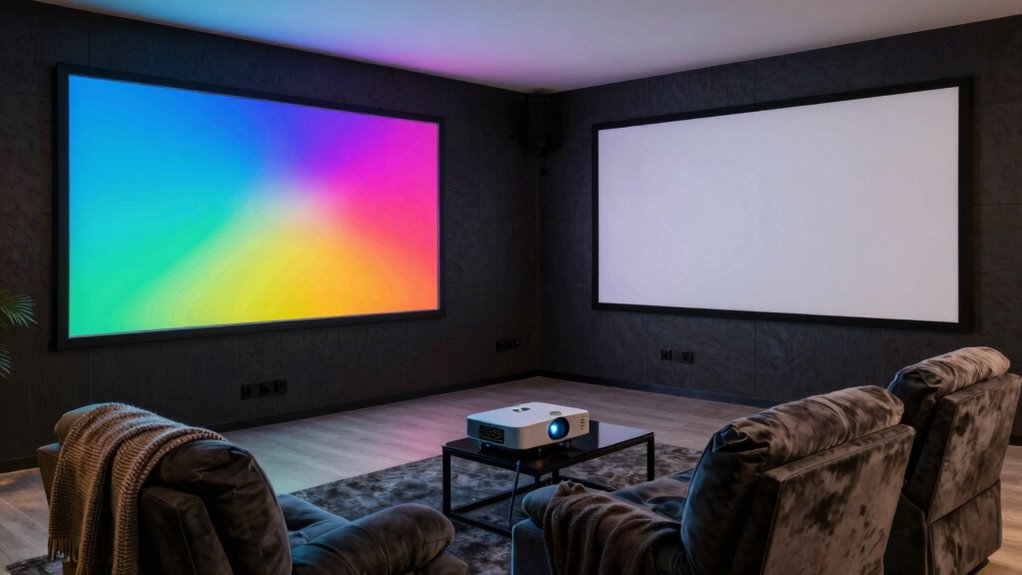

Choosing between a projector and a TV depends on your space and preferences. Projectors offer larger, more immersive screens but need a dark room and careful setup. TVs are easier to install and work well in brighter spaces, but their size is limited compared to projectors. If you want a true home theater experience and don’t mind some effort, a projector might be ideal. Keep exploring to find the best fit for your media room.

Get the little things that make your day delivered free with Prime
- Fast, free delivery on millions of items
- Prime Video, Amazon Music and more included
- Member-only deals all year
Key Takeaways
- Projectors provide larger, more immersive screens ideal for home media rooms, while TVs are easier to set up and operate.
- Projectors require dark room conditions and proper placement for optimal image quality, unlike TVs that perform well in well-lit spaces.
- Installing a projector involves calibration and environmental adjustments, whereas TVs are quick to install with minimal effort.
- TVs generally have lower initial costs and less maintenance, making them a more convenient choice for most users.
- Advances in projector technology are narrowing performance gaps, offering more brightness and clarity suitable for home media environments.

When setting up a home media room, choosing between a projector and a TV can profoundly impact your viewing experience. One of the most noticeable differences is the screen size. Projectors typically offer much larger images, often exceeding 100 inches diagonally, which can make your movies and games feel more immersive. If you dream of a theater-like experience, a projector might be the better choice because it allows you to customize the screen size based on your room’s dimensions and your preferences. On the other hand, TVs generally come in smaller sizes, usually up to around 85 inches, but they still deliver crisp, high-quality images that are ideal for everyday viewing. So, if you want a giant display that fills your entire wall, a projector is appealing. However, if space is limited or you prefer a more straightforward setup, a large TV might be more practical.
Installation complexity is another critical factor to consider. Setting up a projector can be more involved than installing a TV. Projectors need a proper mounting or placement, often requiring a ceiling mount or a dedicated shelf, along with a projection screen or a blank wall that’s suitable for display. Proper positioning, focus adjustments, and calibration are necessary to achieve a clear, sharp image. Additionally, many projectors require a dark room for optimal picture quality, which might mean blackout curtains or controlling ambient light—adding to installation effort. Conversely, TVs are usually simple to set up; just place them on a stand or mount them on a wall, connect the cables, and you’re ready to go. They require less calibration and work well even in well-lit rooms, making the installation process quick and straightforward. Moreover, room lighting conditions significantly influence the viewing experience with projectors, further emphasizing the importance of environment considerations. It’s also worth noting that technology advancements continue to improve projector brightness and image quality, making them more viable for diverse room settings. Furthermore, understanding the cost implications of each option can help you make a more informed decision based on your budget and long-term usage plans. Additionally, advancements in projection technology have made modern projectors increasingly capable of competing with traditional TVs in various environments.
While projectors excel in delivering a large, cinematic screen size, they demand more space, careful placement, and darker environments. TVs, however, are more convenient for everyday use, easier to set up, and provide excellent picture quality in various lighting conditions. Your choice depends on how much effort you want to put into installation and how important a massive screen is to your viewing experience. If you’re willing to invest time and space, a projector can transform your media room into a true home theater. But if you prefer simplicity, reliability, and ease, a TV will serve you well without the fuss.
As an affiliate, we earn on qualifying purchases.
Frequently Asked Questions
How Does Ambient Light Affect Projector Picture Quality?
Ambient light greatly affects your projector’s picture quality by causing screen glare and washing out colors. When there’s high ambient brightness, your image appears dimmer and less vibrant, making it harder to enjoy movies or games. To improve picture clarity, you should control ambient light with blackout curtains or situate your projector in a darker room. Reducing ambient brightness helps your projector deliver sharper, more vivid images without glare or loss of contrast.
What Is the Typical Lifespan of a Projector Bulb?
In the age of dial-up internet, projector bulbs typically last between 1,500 to 3,000 hours, depending on usage and model. You’ll need to plan for bulb replacement, which can be costly, but modern projectors often feature longer-lasting lamps. Keep in mind, energy consumption varies; newer bulbs are more efficient, helping you save on electricity costs over their lifespan. Regular maintenance ensures peak picture quality and longevity.
Can Projectors Display 4K Content Effectively?
Yes, projectors can display 4K content effectively, but it depends on the model’s projection brightness and content resolution. High-quality 4K projectors offer sharp images and vibrant colors, but lower brightness levels may affect visibility in well-lit rooms. For the best experience, choose a projector with sufficient projection brightness to handle ambient light, ensuring your 4K content looks crisp and clear without washing out.
Are There Any Health Concerns With Projector Use?
Think of a projector as a gentle whisper in your room, but it still emits blue light, which can contribute to eye strain. While generally safe, prolonged exposure might cause discomfort or fatigue, especially if you’re sensitive to blue light. To protect your eyes, take regular breaks, adjust brightness, and consider blue light filters. Maintaining a balanced viewing experience helps keep your media time enjoyable and healthy.
How Much Does Installation and Setup Usually Cost?
Installation and setup costs vary depending on your screen size and placement options, typically ranging from $200 to $1,000 or more. If you opt for a projector, you’ll need to take into account mounting hardware and calibration, which can add to the cost. TVs usually have straightforward setups, but larger screens or custom placements might require professional help. Budget accordingly for professional installation to guarantee ideal viewing and safety.
As an affiliate, we earn on qualifying purchases.
Conclusion
Choosing between a projector and a TV depends on your space and preferences, but remember, a staggering 85% of home theater enthusiasts find projectors provide a more immersive experience for large screens. If you prioritize a cinematic feel and have a dedicated room, a projector might be your best bet. However, if you want quick setup and bright images for everyday viewing, a TV could suit you better. Either way, your perfect home media setup is within reach!
projector with built-in speakers
As an affiliate, we earn on qualifying purchases.
As an affiliate, we earn on qualifying purchases.
As an affiliate, we earn on qualifying purchases.
NFL season / tailgating Picks
team gear
As an affiliate, we earn on qualifying purchases.