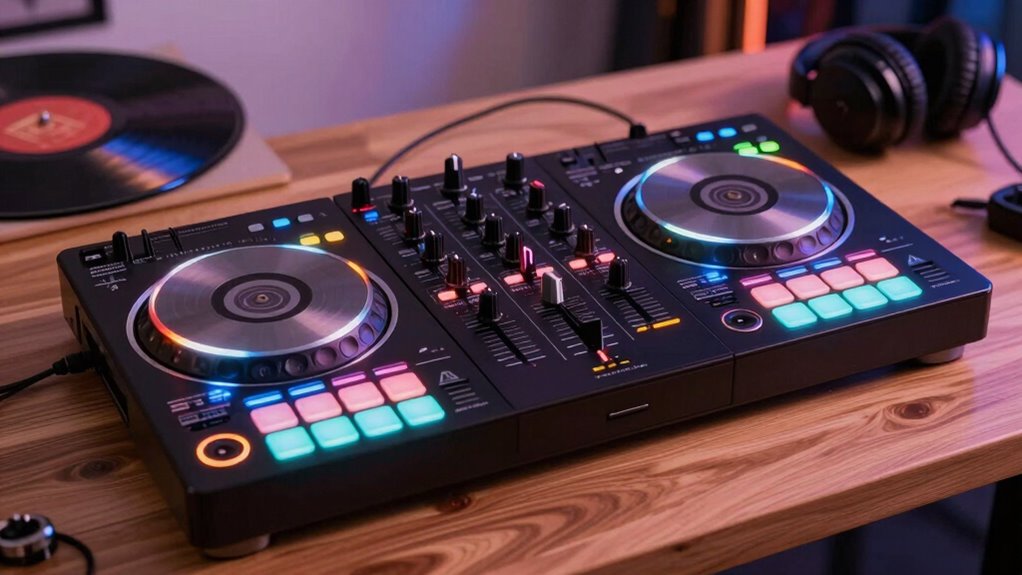

A DJ controller for hobby use is your gateway to mixing, scratching, and creating smooth handoffs. It typically features jog wheels for manual control, faders and crossfaders for blending, as well as EQ knobs and effects for shaping your sound. Connecting to DJ software like Serato or Virtual DJ makes it easy to learn your craft. As you explore further, you’ll discover how each component helps you develop your skills and personal style.

Get the little things that make your day delivered free with Prime
- Fast, free delivery on millions of items
- Prime Video, Amazon Music and more included
- Member-only deals all year
Key Takeaways
- Understand the main components like jog wheels, faders, and EQ controls to operate your DJ controller effectively.
- Learn how hardware controls integrate with DJ software for seamless track mixing and transitions.
- Practice basic functions such as beatmatching, adjusting EQ, and applying effects to develop your skills.
- Explore sound engineering techniques like signal processing to improve your overall sound quality.
- Experiment regularly to develop your personal style and build confidence in your hobby DJing.

Getting started with a DJ controller can seem overwhelming, but understanding the basics makes it much easier to jump into mixing and creating your own sets. When you’re new to DJing, it’s helpful to think of your controller as a bridge between music production and sound engineering. Both skills are essential for crafting smooth passages, managing audio quality, and developing your unique style. Your DJ controller is the centerpiece that connects your digital music library to your creative instincts, allowing you to manipulate tracks with physical controls instead of just clicking through software.
First, familiarize yourself with the main components of a DJ controller. The jog wheels or platters let you scratch, cue, and manually adjust the playback position, giving you hands-on control over your tracks. These are indispensable for beatmatching—aligning the tempo of two songs to create seamless mixes. Next, focus on the faders and crossfader, which help you blend tracks smoothly. The channel faders control volume for individual decks, while the crossfader allows you to shift between them effortlessly. Proper use of these controls is key to maintaining a consistent sound, especially when you’re just starting out in sound engineering.
The knobs and EQ controls are also essential. They shape the sound of each track by adjusting bass, midrange, and treble frequencies. Learning how to tweak these can improve your music production skills by helping you craft a balanced and polished sound. As you experiment, you’ll develop an ear for how different adjustments affect the overall mix. Incorporating audio signal processing techniques can further refine your mixes and enhance sound quality. Many controllers come with effects and filters, offering creative tools to add flair and unique sound to your sets, which is an exciting aspect of music production. Additionally, understanding the hardware components of your controller can significantly improve your ability to troubleshoot and customize your setup.
Furthermore, understanding your software is just as important as the hardware. Most controllers work with DJ software like Serato, Rekordbox, or Virtual DJ. Spend time learning the software’s interface, features, and shortcuts—this knowledge enhances your sound engineering skills, allowing you to troubleshoot issues and optimize your mixes. Practicing regularly also helps you become more familiar with the workflow, enabling you to make quicker and more precise adjustments during performances. Practice beatmatching, EQing, and effects application frequently to build confidence and precision.
In essence, a DJ controller is more than a simple gadget; it’s a gateway to mastering both music production and sound engineering. As you gain experience, you’ll learn how to craft energy-filled sets, refine your technical skills, and develop your personal style. Keep experimenting, stay curious, and remember that every mix improves your understanding of how music flows and how to manipulate sound for maximum impact.
Products Worth Considering

Dyson Car+Boat Cordless Handheld Vacuum

TCL QM64L 85-Inch QD-Mini LED 4K Smart Fire TV

Ring Battery Doorbell Plus (2nd Gen) with Chime Plus, Nickel Silver and White
As an affiliate, we earn on qualifying purchases.
Frequently Asked Questions
What Is the Best Budget-Friendly DJ Controller for Beginners?
The best budget-friendly DJ controller for beginners is the Pioneer DJ DDJ-200. It’s from a reputable brand and offers excellent value for its price. You’ll find a simple layout, essential features, and easy-to-use controls. When doing a feature comparison, it stands out for portability and compatibility with smartphones. Budget brands like Numark and Hercules also offer great options, but the DDJ-200 strikes a good balance of quality and affordability for newcomers.
How Do I Connect My DJ Controller to Speakers?
Imagine you’re a modern-day DJ, and connecting your controller to speakers is as easy as hacking the mainframe! First, use the appropriate audio connection—most controllers have a master output, typically RCA or 1/4-inch jacks. Plug these into your speakers’ input. For ideal sound, place your speakers at ear level and angle them slightly toward your listening area. Power everything on, and you’re ready to spin!
Can I Use a DJ Controller With Headphones Only?
Yes, you can use a DJ controller with headphones only. Most controllers support headphone monitoring, allowing you to cue and preview tracks without speakers. Check the audio output options on your controller; many have a dedicated headphone jack and a booth or master output. Make sure your software settings are configured for headphone monitoring, so you can mix and beatmatch confidently without external speakers.
What Software Is Compatible With Most DJ Controllers?
Most DJ controllers are compatible with popular music mixing software like Serato, Virtual DJ, and rekordbox. These controllers connect through digital interfaces, making setup straightforward. You can easily integrate them with your laptop or computer, allowing seamless control over your mixes. Before buying, check the controller’s compatibility with your preferred software to guarantee smooth operation and an enjoyable digital interface experience for your music mixing sessions.
How Do I Update the Firmware on My DJ Controller?
Updating your DJ controller firmware is like giving it a shot of adrenaline; it keeps your setup running smoothly. First, visit the manufacturer’s website to find the latest firmware update for your model. Download the file, then follow their specific instructions—usually involving connecting your controller to your computer and running the update. This guarantees controller compatibility and peak performance, preventing glitches during your gigs.
Conclusion
Now that you understand the basics of DJ controllers, you’re ready to start your hobby with confidence. Think of it like learning to ride a bike—you might wobble at first, but soon you’ll glide smoothly, creating your own musical journey. Keep practicing, experiment with different features, and enjoy every beat you mix. Remember, every DJ was once a beginner, so embrace the learning process and let your passion for music steer you forward.